Spiderweb provides secure, cost-effective WordPress and Email Hosting for your personal or business domain along with web design services and support. Feel free to give us a call, SMS or email if you need assistance.
Hours – 10am to 6pm AEST – 7 Days
WordPress Hosting
About WordPress
We specialise in providing fast and secure WordPress hosting with optional worldwide content delivery support via Cloudflare. The origin web servers are based on finely tuned nginx and PHP8 FPM configurations to enable the fastest page load speeds. Each WordPress install comes with the Kadence theme and the Kadence Blocks plugin ready for you to start creating your site.
WordPress is an online website creation tool. It is the easiest and most powerful blogging and website content management system (or CMS) in existence today and powers over 29% of all the websites on the Internet. Yes – more than one in four websites that you visit are likely powered by WordPress.
All our Spiderweb customer websites come with WordPress pre-installed ready to start editing your content and layout. It is auto updated once a week (including plugins and themes) so you can rest assured your WordPress site will not get out of date and become a target for hackers over the long term.
About Kadence
Kadence is a lightweight yet full featured WordPress theme for creating beautiful fast loading and accessible websites, easier than ever. It features an easy to use drag and drop header and footer builder to build any type of header in minutes. It features a full library of gorgeous starter temples that are easy to modify with our intelligent global font and color controls. With extensive integration with the most popular 3rd party plugins, you can quickly build impressive ecommerce websites, course websites, business websites, and more.
This theme and it’s Kadence Blocks companion plugin is pre-installed and ready to start using.
About Elementor
Elementor is a page layout building plugin that replaces the basic WordPress editor with a live backend editor, so you can create complex layouts visually, and design your website live, without having to switch between the editor and the preview mode. The page builder enables you to reach a top-notch quality of design without needing to use code or CSS, and without relying on developers for help.
The user interface is extremely friendly, so it only takes a few minutes to get the hang of it. This means, for example, that when you drag and drop widgets, it is done instantly, without any lag time at all.
About Cloudflare
Cloudflare is a global content delivery network (CDN) that increases the performance and security of every website on its network, protecting from a broad range of threats and attacks.
Over 10,000,000 websites run on the Cloudflare network – ranging from individual blogs to e-commerce sites to the websites of Fortune 500 companies to national governments. Cloudflare powers almost a trillion monthly page views – more than Amazon, Wikipedia, Twitter, Zynga, AOL, Apple, Bing, eBay, PayPal and Instagram combined – and over 25% of the Internet’s population regularly passes through their network of ~200 “edge servers” around the globe.
Email Hosting
IMAP Server Settings
Our secure IMAP service comes with a personalised SPAM filter and SPF, DKIM and DMARC email header support which, along with DNSSEC (Secure DNS), provides the best outgoing delivery options to help your messages avoid landing in the recipients Junk folder. We prefer not to provide POP services as it will not work with our custom SPAM filter or multiple devices.
Incoming and outgoing mailserver hostname is mail.spiderweb.com.au
The incoming port is 993 / SSL and the outgoing port is 465 / SSL
Using IMAP
We’d like to encourage everyone, if possible, to switch over to using IMAP instead of POP for picking up their email. It’s not a simple procedure, so we’ll do the best we can to help you if you chose to change to IMAP.
If you need to set up a new computer or mobile device then always select the IMAP option. There is no need to make any immediate changes to your email program. Keep in mind we would like to completely disable the POP email service by the end of 2022.
The advanced IMAP Mailserver settings above should only be needed if autoconfigure does not work with just your email address and password during the setup procedure in your mail program.
Why Use IMAP Instead Of POP?
There are a number of benefits, but the most important reason is that our spam filtering system requires IMAP to be able to view the correct server side “Junk” folder. This special folder holds spam messages and activates the retraining procedure. If you have a spam message in your Inbox then drag (move) it to the Junk folder. If you notice a good message in the Junk folder then drag it back to the Inbox. Either action will retrain your personalised spam filter to classify future messages accordingly.
IMAP stores messages on the remote mailserver and is specifically designed to allow connections from multiple devices. Using mobile phones and separate home and office computer via IMAP means email can be reliably accessed from anywhere because all messages on all devices are synchronised. The status of a viewed or deleted message will be reflected on all devices. You can also create multiple folders to help organise your messages and these folders are also available on all devices.
Website Design
WordPress Design Services
We offer website design services using the Kadence theme and Elementor page builder for as little as $60 per page. Simple updates in the future, that only require a few minutes of our time, are free. Ask us for a quote on more complex sites as we can recommend more proficient and experienced e-commerce website designers if you need a truly excellent business website design.
WordPress now powers well over 35% of all websites so it’s a natural choice for designing and managing a website and is our specialty platform.
Our servers are fine tuned to provide fast page load times and we can extend global reach by using Cloudflare.
We also specialise in using the Elementor Page Builder which is a very flexible website creation tool for us and quite easy for a site owner to make simple changes.
Linux Support
Why Do We Prefer Linux?
Linux is a secure and flexible open source operating system that powers our servers. We’ve had a couple of decades experience installing and managing our servers, so we can provide hourly Linux server support for anyone using Ubuntu servers. Linux can also be used as an interesting free desktop system for anyone who does not need to run proprietary Microsoft or Apple applications.
A few years ago Linux was only considered useful on internet servers and devices like network routers that connect households and businesses to the internet itself. Linux desktop systems were hard to use and only suitable for “nerds”, “geeks” and hardcore software developers.
These days (in 2021) that is no longer true. A Linux based computer can sometimes be easier to use than a Windows or Mac computer. Not always but in many situations, it can often be simpler to get the job done with a Linux desktop.
Points For And Against Linux
First, we will list some good reasons to consider using Linux and then a list of what some folks would consider negative points.
The Good…
- Free as in the cost to install and use Linux except for the time it takes to understand a different operating system.
- Free as in open source which means anyone is allowed to copy and modify Linux systems and give away the results, also for free (ideal for schools).
- Secure by default. Common viruses and Trojans targeted at Windows computers will not run on a Linux system so virus checking software, in general, is not even needed.
- Privacy in that there are no self-interested direct upstream parties that want to hijack your personal information for commercial gain. However, certain well known online social media providers will still track your online data.
- Efficient enough to run on a wide range of PC desktop and laptops released in the last 10 years and does not slow down from software bloat or promotional adware.
- Maintenance and updating the operating system and installed application packages is quite easy. New applications are just a click away without having to pay for them.
The above points summarise the main reasons why we prefer Linux so now let’s look at some negative drawbacks.
The Bad…
- Applications – a large range of high-end professional creative and commercial business class software will not run on Linux. The native Linux equivalent software is often not up to the same standard and polish of some proprietary applications.
- Games – some of the best high-end AAA action games will not work on Linux and even though there is a huge range of games available they sometimes do not work as efficiently as on a PC or dedicated gaming console.
- Mediocre hardware and peripheral support. This is not so much the case these days and is steadily improving, but some obscure printers and external devices have little or no driver support.
- Fragmented software ecosystem because of the anything-goes nature of many aspects of Linux from a variety of different desktop options to multiple “distributions” and applications all trying to achieve a similar end result but ultimately just competing against each other.
- Support is provided, in most cases, by “the community” rather than a well-known single upstream provider. This can be a daunting prospect when a Linux user can’t call upon friends and family to help with simple problems.
The Not So Ugly Summary…
We could go on and add more pros and cons for using Linux, or not, but these are some of the most prominent points either way. If the initial positive points are of interest to you, and you are not put off by the negatives then you either are already using Linux or may very well be a good candidate to install it on your secondary spare or even your primary computer. If so then feel free to contact us about how to go about installing Linux or how to get the most out of your Linux desktop when using our online Spiderweb services.
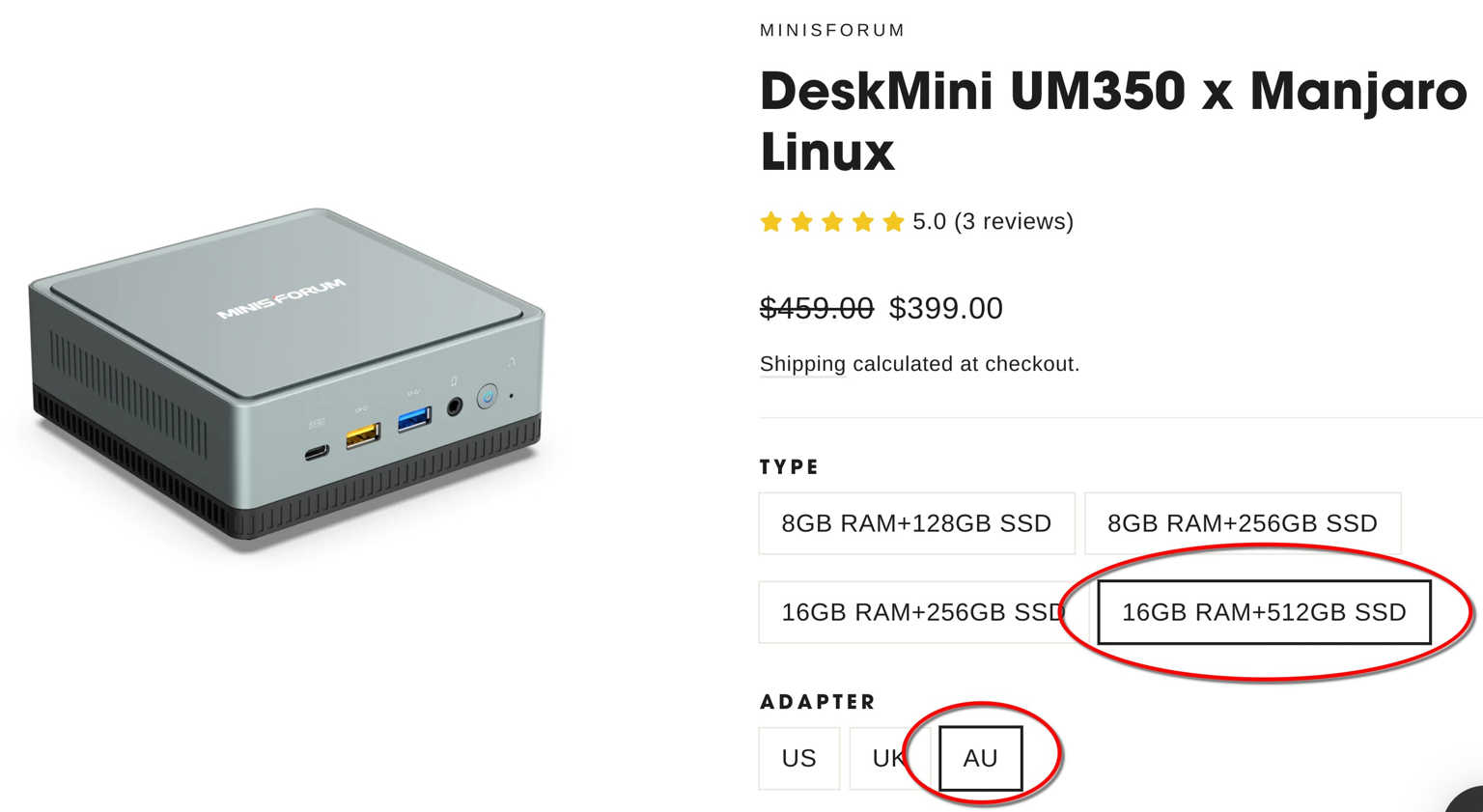
Linux Computer
Spiderweb recommends and supports this excellent and tiny but powerful Linux computer. It costs about $570 AUD delivered, depending on the current exchange rate and import duties. Click the image to see more details.